Read a bid on the board
The page Bids with its board and table, the card of a bid, the bid's page, and the bids set aside as Not ours.
Open Bids in the menu, after Deals. Every bid in your workspace stands here as a deal. The page has two views: Board and Table. Search finds a bid by its name or its buyer, and + New deal adds a bid by hand.
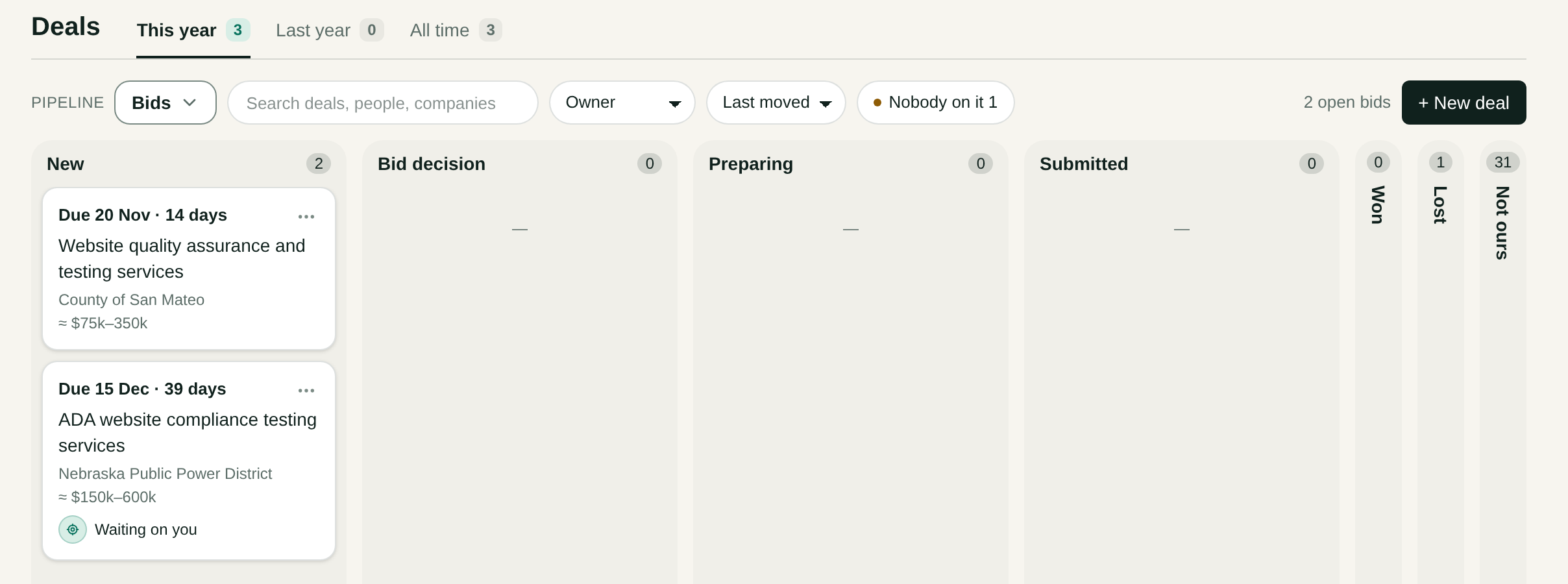
The columns
| Column | Meaning |
|---|---|
| New | A source brought this bid in. Nobody decided yet whether you bid. |
| Bid decision | A person decides whether you bid, bid as a subcontractor, or do not bid. |
| Preparing | You decided to bid. The bid is being prepared before its due date. |
| Submitted | Your bid went to the buyer before the due date. You wait for the award. |
| Won | The buyer awarded you the contract. |
| Lost | The bid closed and you did not win it. |
| Not ours | The bids set aside by your codes, the triage or a person's No bid, still due. |
You move a bid between columns. Bid and Bid as a subcontractor move the deal to Preparing. No bid takes the bid off the board into Not ours: it is a decision, not a lost deal. Marking a bid submitted leaves it where it stands.
The card of a bid
A card reads from top to bottom in order of what matters:
- The due date and the days left, such as Due 20 Nov · 14 days. It turns amber at three days or fewer, then reads Due tomorrow, Due today and Was due.
- What the buyer buys, in plain words. A bid with no such name shows the notice's whole title. A card never cuts a name.
- The buyer.
- One price. The amount a person set, or else an estimate with the sign ≈.
Waiting on you means a card of this bid waits for you. To see the nearest due date first, set the sort to Due first.
The board counts its bids and does not add up their prices. An estimate is a guess about a contract you have not won, so a sum would mislead you.
The table
Press Table to see the bids side by side. The view comes at once, and the address names it.
| Column | What it says |
|---|---|
| Bid | What the buyer buys. Press it to open the bid. |
| Buyer | The public buyer. |
| Due | The due date with the days left. |
| Price | The amount a person set, or else the estimate with the sign ≈. |
| Stage | The bid's column on the board. |
| Scout | The scout that brought the bid in. |
The table opens with the open bids first, the nearest due date on top, then the closed bids. Columns can add Why, the triage's reason, under each bid's name. Narrow the table by Stage and Scout, or search it.
The page of a bid
Press a card to open the bid.
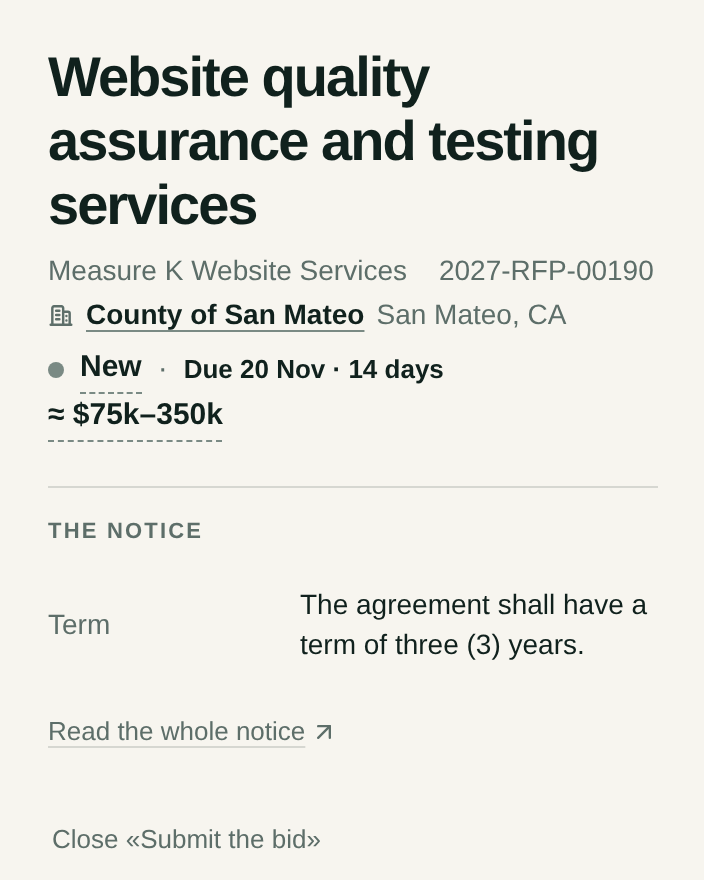
| Part | What it holds |
|---|---|
| Head | What the buyer buys, the notice's own title and number, the buyer, the column, the due date and the price |
| The notice | The notice in short, and Read the whole notice, which opens it on the buyer's own site |
| Papers | The buyer's files, each Kept in Drive or with the reason it waits, then the papers Tommo Bids wrote |
| People | The buyer's person: the contact the notice names, else the first contact with an email the files name. Or No person at the buyer yet |
| Came | The day, how the bid came in, and the triage's sentence |
| Technical details | The buyer's kind and place, the day posted, the kind of notice, NAICS and PSC |
| Story, Emails, Log | What happened on this bid, and when |
What Tommos takes from the files
When a bid becomes a deal, Tommos reads its files and keeps these facts, each in the file's own words, with the file and its section:
- The people the files name as contacts for this bid: name, title, email and phone. Who the deal's person is says which of them joins the deal.
- The dates: the last day for questions, a meeting before the bid and whether it is a must, the day the answers come, the day of the award, the start of the contract.
- How the bid is sent: a portal, an email or an address, the format, the number of copies, a limit of pages.
- How the bid is judged: the criteria with their weights.
- The money and the term: the budget or estimate when the files name one, the term of the contract and its extensions, and the kind of price.
Tommos keeps a fact only when its words stand in the file. A fact the files do not hold stays empty, and nothing is said in other words. Tommo Bids reads these facts when it prepares the bid.
To set your own price, press the price in the head and type the amount. From then on the card and the page show your amount with no sign.
Once you say Bid, the plan's ··· menu also offers Close «Submit the bid». See Submit a bid.
The column Not ours
The last column of the board holds the bids set aside as Not ours, only those due today or later. Press it to unfold it.
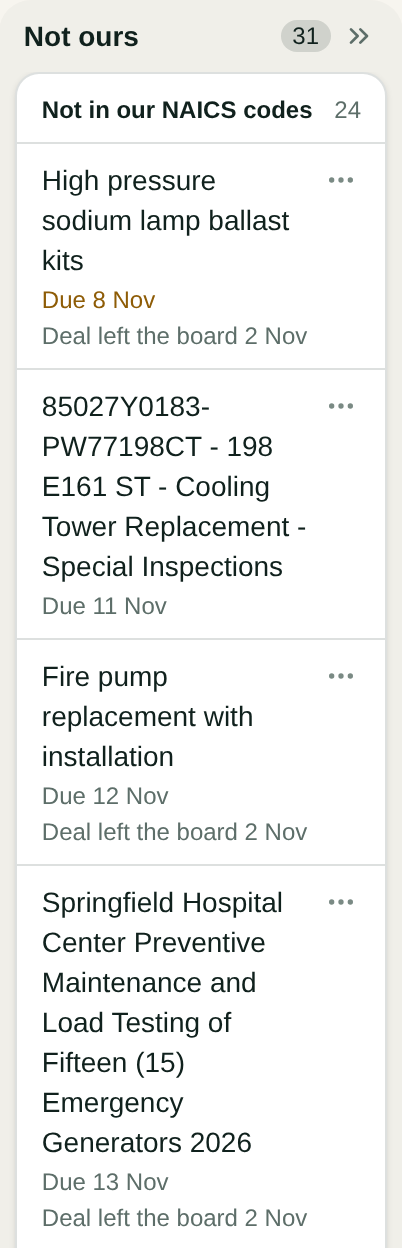
It has up to three groups, each with its count:
- Not in our codes lists each bid with its name and due date. Our codes are in Settings opens your codes.
- Sorted out by the triage lists each bid with its name, due date and reason. Press a long reason to read it whole.
- Sorted out by a person lists each bid a person answered No bid, with who and the day, such as No bid · Ann Lee · 16 Nov, and their reason.
The name of a bid opens its notice at its source. Its ⋯ menu says Open in HigherGov for a bid of HigherGov, and Read the whole notice for a bid of another source.
Two ways turn a bid into a deal when you disagree with the triage:
- Open a row's ⋯ menu and press Work the bid.
- Drag the row to the first column. A drop on another column says «A bid is worked in the first column first.»
Tommos then makes the deal and Tommo Bids opens its job, and the triage reads your decision on similar bids. A row that says Deal left the board with a day offers Restore the deal, which brings the deal back with its files.